Showing posts with label xiaomi laptop. Show all posts

Tuesday, 4 September 2018

Android Pie spotted to have come with Open Beta 1 released to OnePlus 6

Android Pie spotted to have come with Open Beta 1 released to OnePlus 6


It's not near that Android 9.0 is currently rolling out to many devices though we still have some that's yet to receive the update either because its not their turn yet or not ripe to receive yet but the statistic has revealed that many users are now enjoying it.

Wrapping the story, OnePlus has made available to it customer the Open Beta 1 source for any user that want to have a taste of Android 9.0 update before it proper roll out.
Android Pie spotted to have come with Open Beta 1 released to OnePlus 6
It was reported that the update is not yet working properly due to some bugs that came with it though its not serious bugs but if you're not mind then go ahead to have the taste, the bugs includes Google Pay not working and some unexpected app behavior.

For instance you may be seeing some pop-up notification saying "Device is not certified by Google" when you're using the Play Store, if you don't mind then you can proceed it has nothing to do with your phone or account.

Here are what you find in new log update;

Update system to Android 9.0 Pie
Brand new UI for Android P
New Android P gesture navigation

Other new features and system improvements

Integrated OnePlus customization features
Supported accent color customization
New Do Not Disturb mode with adjustable settings
New Gaming Mode 3.0: Added text notification mode, added notification for 3rd party calls


If you thought of having a taste of it then here is the link to download, mind you, you'll need to do some work as for the installation and also the bugs that comes with it, so keep it right inside of you to avoid casting the blame on someone else.

And if you're not in hurry , then you can wait till Android 9.0 update comes out officially but there's no solid statement about when it will be release to OnePlus 6.

Tuesday, 7 August 2018

9 Easy Ways To Send Money

9 Easy Ways To Send Money 


At some point, everyone owes something to someone. Maybe he owes a lunch to a colleague, or a friend bought him a ticket from the game or a friend sold him his DVD player. You can even hire independent professionals abroad and want to pay for them. Anyway, why not send money online immediately? Therefore, today we will see some simple ways to transfer money in any international, local or one-day bank account.

1. Wire transfer

Making a bank transfer is as simple as making a phone call. Enter the name of the recipient, the bank account number, the SWIFT code (international transfer) and the bank routing number of the receiving bank. You also need to have your own bank account. Alternatively, you will need a computer or phone with an Internet connection to log in to your account. Or call or visit the bank. Determine the number of electronic transfers. Keep in mind that banks charge a small fee for such transfers, which may vary if they are sent internationally.

2. Request for cash for parties

If your recipient has an account in the Square Cash application, you can also send money online immediately. On the other hand, you may or may not have an account here. However, you need to know the URL of the recipient's box label. This is a great way to send money online immediately, but it is not available outside of the United States. Other main applications include Venmo.

3. PayPal

This is the best way to transfer money internationally or nationally, and you do not need to have a PayPal account. If you do not have an account, ask the recipient to create a PayPal link and send it to them. You can also use your SignUp link to send money with a credit card. The advantage of using this method is that you can send a large amount of money internationally, and the transaction is quite fast. PayPal also has its Xoom service that can send money worldwide, recharge mobile phones and pay bills.

4. Western Union

There are several options for Western Union. You can use a debit or credit card to transfer money to other national or international bank accounts, Western Union agents, mobile wallets or from your bank account to the location of your bank / agent account. The cost of these transactions ranges from $ 5 to $ 10. Cash withdrawal using this method is considered the fastest. In terms of shortcomings, this method of using a debit card to send money online is quite inconvenient for a small amount.

5. TransferWise

Most banks charge up to 5% of the hidden fees. TransferWise is almost 8 times cheaper. The advantage of using this method to send remittances internationally is that they use the average or intermediate market exchange rate between buyers and sellers. One disadvantage is that without online chat, they also have the greatest transfer restrictions. Read your comments before using TransferWise to send funds.

6. Check

Personal checks are the safest and easiest way to send money to people. This is a safe method for payers, since personal checks can be canceled at any time. However, there may be some inconvenience for the recipient because your bank may or may not accept foreign checks. In addition, the beneficiary may have to pay the exchange rate. This method is also slow due to the need to send the check by mail. Some checks are only valid for a certain period of time that exceeds this period.

7. Remittances to the email address

Many banks offer this convenient way to send money to people who do not have a bank account. Log in to your account and go to the "Transfer" tab. Choose the option to send money to your email ID or phone number. This is a low cost way to send money.

8. PoPmoney

You can use your mobile phone to send money to anyone at PoPMoney. It's simple and secure, and you can register directly on your website or through your bank account. You can use PopMoney to send money, send a request for payment and even collect money from the group. It is also easy to set up regular payments with this system.

9. WorldRemit

Are you looking for the best way to be simple, fast, cheap and remitted internationally? Try WorldRemit because they offer a free first transfer.

As you can see, there are many ways to send money to someone who does not have a bank account, online or with a debit card. However, all this requires your attention. Explore a variety of options so you can make informed decisions.

Sunday, 12 November 2017

The Xiaomi Note Book pro Features An 8th Gen CPU and a Battery That Lasts 10 Hours

Looking for a laptop with an apple Macbook vibe that runs windows and  costs about a thousand dollars?, The xiaomi note book pro may just be your answer.

The xiaomi note book pro questions the relevance of the apple MacBook with a striking resemblance and sufficient hardware specifications at a lower price.

Xiaomi notebook pro


Below is a quick scan of the features of the xiaomi notebook pro;

DESIGN

The xiaomi notebook pro as early stated, bears striking resemblance with the apple MacBook. Taking a look at it's aluminum body, you may think the xiaomi note book pro is an apple MacBook that is awaiting it's apple logo.

That's exactly how the xiaomi notebook pro looks, it was built to look just like the apple MacBook.

The xiaomi notebook pro features an aluminum metal plain  build with no logo on the lid just like other xiaomi laptops.

The xiaomi notebook pro weighs 1.99kg.

On the right side of this laptop there are two 2 USB c ports with no thunderbolt support and an SD card slot.

Xiaomi notebook pro


On the left side of this laptop there are two full size USB ports, a full sized HDMI port and an headphone jack.

Xiaomi notebook pro


Lifting the lid of the xiaomi notebook pro, there is a 15.6 inch IPS display with a screen resolution of 1920x1080 guarded by  gorrilla glass sheet.

This display has a 60Hz refresh rate, it is Bright and has good viewing angles.
60Hz display on a laptop may sound somehow in your ears owing to the fact that razer just released a smartphone with a 120Hz display.
But just like the apple MacBook, the xiaomi notebook pro wasn't built for gaming, more on that later.

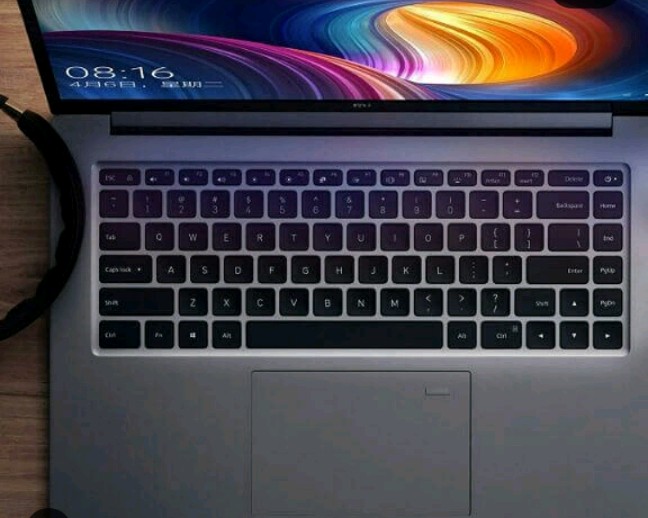
Below it's 15.6 display is a set of well space backlit keyboard with a key travel of 1.5mm.

Xiaomi notebook pro

Xiaomi notebook pro


The xiaomi notebook pro has a large keypad just like the apple MacBook and on top the keypad on the top right corner is it's finger print reader.

HARDWARE


Moving on to it's hardware department, the xiaomi notebook pro may be a killer laptop to some and others a regular laptop , depending on what your daily laptop use entails.

The xiaomi notebook pro features a super hyper threaded 8th Gen core i5 8250u CPU with 6MB cache, 8GB  soldered ram, 256 GB Samsung solid state drive (SSD).

There is an option for higher specifications with a higher price tag.

The xiaomi notebook pro also features Nivida MX 150 graphics card which gives 2GB of GDDR5 Video memory based on Pascal architecture.
The Nivida MX 150 graphics card featured on this laptop is supported by Intel's integrated 620 UHD graphics.

The Nivida MX 150 graphics card featured on this laptop can be compared to the Nivida 940 MX graphics card.

This laptop features Optimus technology which allows applications to switch between it's Integrated 620 UHD graphics card and the dedicated Nivida MX 150 graphics to save battery.

Speaking of battery, the xiaomi notebook pro features a 60 watt hour battery that will take you about 10hours 40 minutes on steam. That's 40minutes higher than the battery on the LG gram 15 which held the record for the longest lasting battery previously.

In addition this laptop features Dolby atmos speakers with Harmon Kardon infinity sound system inbuilt.

Ok this laptop isn't for extreme gaming, it's for average games and for doing a lot of photoshop and Adobe premiere.

I know $1000 for a laptop that looks just like the apple MacBook is some serious reduced budget laptop, but if you consider the retina display and better processors found on the apple MacBook, you may still want to consider purchasing the MacBook.

But if you are not in for the extremes and a $1000 dollars is just the kind of budget you have for a laptop, the xiaomi notebook pro is a best buy, you won't regret buying it.

Would I go for the xiaomi notebook pro over the apple MacBook and save some cash?


 From  a tech enthusiast who has never owned a MacBook and doesn't plan owning any, I would say yes. Your own view may be different. Once again the xiaomi notebook pro is a best buy.


Copyright @ 2013 Tech Texicop.